


April 2025 Author: Sven Rath, @eversinc33
Introduction
At r-tec, our Pentesting team has compromised every single Active Directory we have tested (with an open scope) over the last 9 years. In many cases, the same vulnerabilities have led us to domain compromise in terms of getting domain administrator permissions. This article breaks down common attack vectors and their true causes – which are almost always rooted in some sort of organizational issue.
1. Legacy Software: But not the way you think
You have probably heard it often enough, legacy software, especially if it has known vulnerabilities, can lead to compromise. However, there is another reason why legacy software, even without any known vulnerabilities, can sometimes lead to full domain compromise: on a regular basis, our Pentesting team regularly finds environments where one or more domain controllers are configured to support NTLMv1 authentication flows. This is a configuration that can easily be abused to compromise a domain controller and thus the entire domain (as described by our Security Consultant Alexander Wolf in this blogpost.

Often we find that this is a deliberate configuration and the client is well aware of the security risks, but some business critical legacy software requires NTLMv1 support. While firewalling and network segmentation can limit the exploitability, ultimately the only solution is to get rid of that legacy software and configure the domain controllers in a secure manner. But there is another reason why we still see this misconfiguration on a regular basis:
2. Configuration drift and technical debt
Often, Active Directory Domains are 10-25 years old and thus, of course have accumulated quite some technical debt over their lifetime. An example would be a “Default Domain Controllers Policy”, which was untouched ever since it was created and thus has insecure legacy configurations (such as NTLMv1 support). Bad provisioning can also be a reason for insecure configurations: if a server, which was previously handled like a Tier-1 or Tier-2 asset, was to be provisioned to a Domain Controller, it might carry over some configurations, which are not suited for a Tier-0 asset like a DC. This can also be a cause of the next issue:
3. Active Directory Permission Jungle
For us Pentesters and Red Teamers, uncovering the sometimes very complex relationships between Active Directory objects is a natural task, augmented by tools like BloodHound. For many IT departments however, these relationships are not that clear.
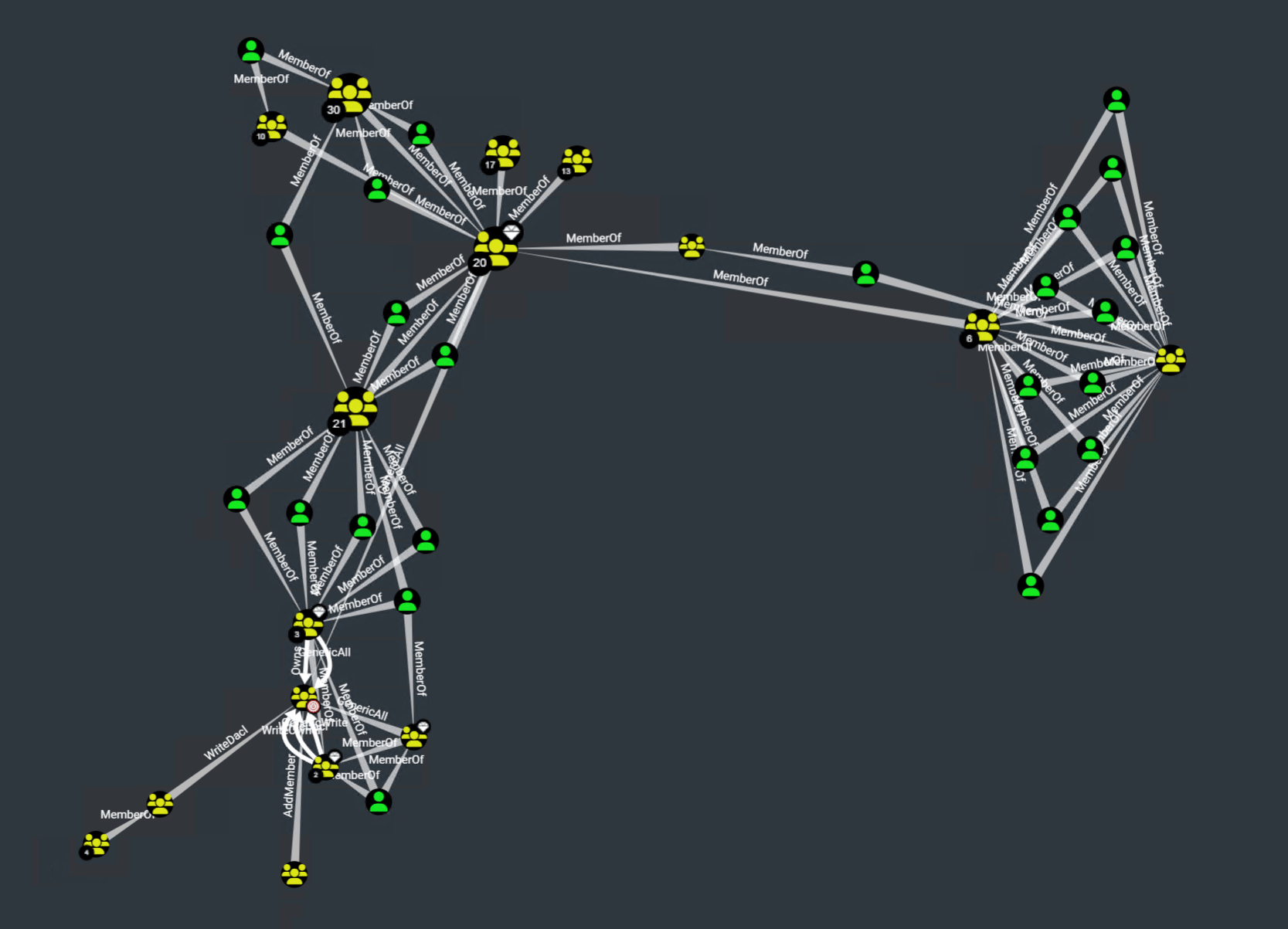
More than once, I had client reactions like these in post-project debriefs:
- “Oh, everyone can add themselves to the VPN group?”
- “Oh, this group can reset all users passwords?”
- “Oh wow, the
Domain Usersgroup hasGenericWritepermissions over EVERY object in the domain?”
A pentest will uncover the most critical of these object relationships for you but is ultimately just a snapshot in time. That is why we also offer BloodHound workshops for our clients, where we empower your IT to uncover these relationships by themselves.
There are also some more subtle misconfigurations, like _bad ownership_: If provisioning was done like described in the previous paragraph, a DC will end up being under the ownership of the user that originally created the computer object before it was a DC – and that might as well be some random Tier-2 account. If that account is compromised, an attacker can turn that ownership into full domain compromise by taking over that DC account. So what is Tier-0 anyway?
4. Bad Tiering: Tier-0 is not just your Domain Controllers
If you have implemented the Microsoft Tiering model or the more modern Enterprise Access Model, that is good. But what assets are part of your Tier-0? If it is just your domain controllers and domain admins, then I have bad news for you: a compromise of an exchange server can lead to domain compromise, because they are allowed to DC Sync. A compromise of the “backup operators” group can lead to a full domain compromise, because every member of that group can back up the registry of any domain controller. “Account operators” can reset passwords of likely at least one other account, which is indirectly a domain admin. Certificate Servers? Compromise leads to a golden certificate, so an attacker can impersonate every user in your domain.
Backup servers? Hypervisors? AV/EDR management server? Software distribution platform? All that (and more) should be classified as a Tier-0 asset.
5. Bad (legacy) passwords
So you have read many times that bad passwords are one of the core issues in enterprise security and implemented a password policy that mandates long, complex passwords. But did you also reset the passwords of ALL accounts after setting that policy? You informed all the users to set a new password, ok, but what about that sqlservice account with the password “sqlservice” (that is also a domain admin) that you set up 8 years ago? Or the breakglass admin with “Admin123”? Often, accounts are configured as services on many machines, and IT does not want to change them, afraid that one of these systems might fail. These outliers can then turn out to be one way to domain compromise.
So if you set up a policy, make sure to enforce it on ALL users by forcefully resetting their passwords. Additionally, password blacklisting makes sure that passwords are not only long and complex, but are also not too trivial, like “SummerSummer2024”. And you really should make sure to not use generic patterns like password4\<servicename\> - we will find them and we will use them.
Another issue with passwords are default initial passwords as e.g. set by helpdesk employees. As an attacker it is often easy to get a hold of a standard password used in an environment, e.g. through reading internal documentation or simply calling the helpdesk ourselves. Testing that password across the domain often uncovers accounts where the initial password was not changed (e.g. because the user never logged on), or a slight variation was used instead (“Start12345!!” Instead of “Start12345!”). Ideally, the helpdesk process should include setting truly random and cryptic passwords.
But even if your passwords are hardened, there is at least another pitfall:
6. Insecure storage
Insecure storage can be one of the most impactful vulnerabilities, yet it is omnipresent and can even be found in some of the more hardened environments we test. Usually, files are put on network drives on different servers across the network. The issue with that is that no one really has an oversight on who can access what shares and files.
One example would be that “transfer” share you have, where everyone can drop something for others to quickly share over the internal network – I assure you at least one person has saved some credentials in there. And credentials in files can have many forms: config files with secrets, the passwords.txt files that people use, or a KeePass database, stored next to its keyfile (or protected with a weak secret).

Other juicy files we find on our engagements are backups of servers, which contain the registry and thus local admin credentials or even self-written applications (that “admin-tool” your IT department wrote themselves), which contain some sort of hardcoded credential that can be uncovered through simple binary analysis.
While traditionally, this was a problem mostly in on-premises systems, of course the same concept applies to the cloud and e.g. Office365 – Sharepoint Sites, OneDrive, and Teams Channels are all valuable sources for an attacker who is looking to acquire sensitive data.

Internal Knowledge databases, ticket systems, and intranets, such as Confluence, often also contain valuable information, ranging from info about internal processes to plain-text credentials. And if you plan to set up a Large-Language-Model (LLM) for your employees as a helpdesk, be aware of what data it can access and how an attacker might abuse it.
The big issue here is that it is very hard to detect this kind of activity: a normal user browses shares all day – how do you know when someone is doing it with malicious intent? If the attacker compromised a cloud access token, they might even be doing it from their own machine, giving you no endpoint visibility at all. Or do you really audit all cloud access?
Besides making sure your permissions for shares, Teams, SharePoint sites, and the likes are all set up, you should discourage users to store this sensitive data in plain text in the first place: raising awareness and offering a simple-to-use, centrally managed password storage solution is essential to prevent these kinds of vulnerabilities.
7. Insecure defaults
Did you know that if you setup Active Directory Certificate Services on your domain and install the web enrollment endpoint along with it, you just set up a vulnerability that allows any authenticated user to compromise your domain? Are you aware of the many pitfalls that Microsoft SCCM employs? Unfortunately, Microsoft ships many of these insecure default configurations with their different components. Most of the time, IT departments lack time, resources, and the offensive security mindset to account for all these misconfigurations. Usually, unless you have a dedicated offensive security team, your next Pentest will uncover them. One such Pentest evergreen is the “NBNS/LLMNR Poisoning” vulnerability. This legacy protocol is active by default on Windows and allows an attacker with local network access to gain a Man-in-the-Middle position. From here on, NTLM authentications can be relayed to arbitrary hosts on your network to execute code, exfiltrate credentials, or read data. IPv6 DHCP messages can also be exploited by an attacker to get into that position, and there are many other protocols, all vulnerable by default. While security measures against these kinds of attacks exist (e.g. SMB Signing or LDAP Signing), they are disabled by default, and we rarely see them used in environments that did not undergo a few pentests already.
Most of the time, these “default vulnerabilities” come from the idea of preserving backwards compatibility – but should you really try to be compatible with Windows Server 2003?
Of course insecure defaults can not only be found in Microsoft products, but in all sorts of software. Many times, instruction on secure configurations are hidden deep in the documentation. If you use a software which has extensive privileges in your environment, such as Unified Endpoint Management (UEM), Server Management Solutions, Backup Suites, CI/CD Platforms or Patch Management solutions, be sure to audit and harden their configurations.
What now?
While this list is not exhaustive, it points out why having good security is more than just fixing vulnerabilities and ticking boxes. Root causes are often more complex than their symptoms, and ignoring them will only lead to more vulnerabilities in the future. Unfortunately, fixing these comes at a higher cost and often involves working on quite a bit of technical debt. A good offensive security consultant should not only hand you a list of vulnerabilities they found but also point you towards their root causes and show you how to fix them. That is why we at r-tec also offer consultancy for all the points listed above, be it a general security checkup and gap analysis, developing and implementing a proper Tiering model, network concept, password storage or helping you to securely configure your services.
Ultimately, fixing vulnerabilities without working on the root causes is like slapping paint over a rusty spot on a car – it may look fine for a while, but the problem will keep growing underneath, eventually causing even more damage.
You can book a non-binding presales call with our offensive services team to find out if your environment is also vulnerable.